Written by
JM
January 15, 2010

Technology insiders claimed that Apple’s tablet PC which is a touch screen device will launch in March. In addition to that, the device is twice the size of the iPhone.
It is expected that Apple will announce the said gadget on 26th of January though there’s no official announcement.
On the other hand, Wall Street Journal claimed that the tablet PC will be launched in March and will come in either 10 or 11-inch touch screen.
What will be the name of the new upcoming product of Apple? It is no other than – iSlate after registering the domain islate.com, but this is not confirmed by the company.
Many analyst predicted that this tablet PC will focus more on entertainment. And others think of having a new version of of Apple’s iPhone OS that runs a new category of larger applications.
Let’s just wait and review iSlate!
Written by
JM
January 12, 2010
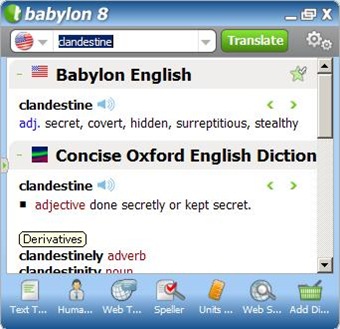
Babylon 8 is the solution for my need of having an excellent dictionary in my computer. I need dictionaries for finding the meaning of different words that I’m not familiar with. As I am surfing through the internet, I encounter a lot of words that I don’t know the meaning. This PC dictionary application helps a lot.
Babylon 8 doesn’t only includes a dictionary but also many different services such as thesaurus, speller, unit converter, translator to any language and more.
As for me, I will rate Babylon a perfect score. It all contains the things that I need. And it is really portable!
The thing I love the most on Babylon 8 is that I could just simply press Control + right click on the word to show the meaning and synonyms of the word. It will take less time than using a real dictionary. I would recommend this to all especially to writers and students.
Written by
JM
January 10, 2010
It’s been a rumor that Windows 7 boots quicker than other Windows versions. Is this really a rumor or a fact? The answer is YES but only a little. The more programs you installed, then the slower the PC will start or boot. Your PC is like in a street where in if there are more cars in a lane then it will take more time for everyone on the lane.
We have the answer to your PC that boots slowly. It is no other than – Startup Delayer!
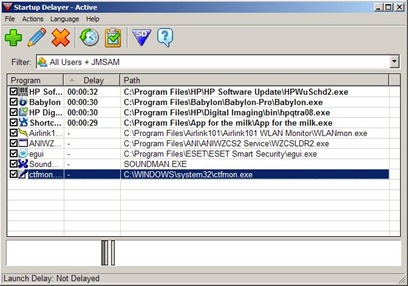
Startup Delayer is a tool that tells the startup program you select to sit tight, be patient and ran a little bit later after the traffic is done. The result is that your PC will boot quickly.
This presents all your startup programs. To set a delay for a specific program then drag it the item at the bottom. Drag it to the left to decrease the delay and the right to increase it.
A good news is that it’s a freebie. Meaning no charges at all! Say goodbye now to your slow booting PC you have.
Presenting a sleek, personal multimedia player called the iRiver P7. iRiver is really producing a lot of impressive multimedia player.

This is created for any multimedia use. It has a unique interface – a magazine style like that makes it easy to browse to your files. It also have FM tuner. Available in 8GB and 16GB.
The screen shows the currently playing song, the cover art, the fm station , thumbnails of your photos, date and time and more. It also have a travelers clock, calculator and calendar as well. It really have a nice music interface. This is a touch screen player which is really a click on today’s technology. You also have a great browser for all of your photos. You could also make a slideshow with those photos and more! The LCD screen is so gorgeous that makes the video files really good.
- It is easy to use and easy to setup.
- It has extremely unique interface that look very cool.
- 50 hours of audio playback or 7 hours of video playback in one charge.
- It supports tons of file formats such as mp3, mp4, wma , wav, mpeg, div and more!


At the side, you have headphone and microphone, lock button and micro SD slot to expand the built-in memories. At the top, you could see touch sensitive volume controls. And at the bottom, you could find the USB connector which comes with the USB connector in your box
This is a great alternative for a multimedia player!
Written by
JM
January 01, 2010

This is the new desktop of HP called HP Compaq 6000. This is considered to be your business desktop for its good specs making it real fast. It will then help you with your productivity.
It have Intel Core 2 Quad Q94000 2.6 GHz. It also have 4GB DDR3. DDR3 is the latest generation memory available now. It’s much faster than DDR2. You now believe how fast this is!
Another feature is that it have 500 GB Hard Drive 7200 rpm. This is enough space for your videos, music files , documents and others. Along with it are free HP mouse and keyboard.
The front panel:
4 USB 2.0 Ports
Input and Output for Microphone and Headphone
Activity Lights
Power Button
The Back Panel:
Input and Output for Speakers or Headphones
PS2 for mouse and Keyboard
Play Port – Future of connecting monitor to your computer
VGA Port
6 USB 2.0 Port
Port for your Internet
Inside:
It’s really professional inside.
You can load up to 4 DDR3 Memory Inside
You can easily load another hard drive
To make it short, it’s easy to upgrade.
Written by
JM
December 26, 2009
When you boot up your computer, you wait for all sorts of programs, widgets , updates, remnants of forgotten installations., and more. This will actually take lot of time. Here is a way to control that effin’ startup programs by configuring which and which not to run at the startup:
1 . Go to Start >> Run OR Windows + R

2. Something will pop up.
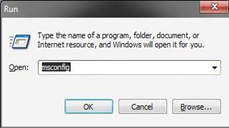
3. Type msconfig on the run window and press OK.
4. System Configuration Utility will open.

4. Then click the word startup above it.
5. Check the checkbox corresponding to the programs you want to run at the startup like your antivirus.Uncheck those you don’t want to run.

6. Lastly, Press OK.
Tip: Don’t remove your antivirus in the startup since it is for your protection.
Written by
JM
December 25, 2009
1. AZNV (.tv)

This is a site full of Asian dramas and movies including Japanese, Filipino, Korean and others. The quality of the videos are quite alright. If we’ll rate the audio and video then it will be 9-A;9-V. But this is not an ordinary streaming site, it needs Winamp. Winamp is required in viewing those videos.
Note: They also include some Anime.
This is highly recommended!
- Download Winamp here : http://www.winamp.com/
Leave comment if you want an invitation. First come for serve since it’s limited.
2. Dramacrazy (.net)

This is also the same as the others giving you tons of Asian dramas and movies. This will let you choose from which video source/site to watch from. Unlike the AZNV, it will let you watch sites with just your mere player and flash player installed with your browser. This is also highly recommend!
3. Mysoju (.com)

This is just like Dramacrazy and AZNV. This is also superb for providing an up-to-date drama and movie listing.
I am sad to say that many videos are corrupted or not working. But this is my first drama provider so I would like to recommend it to all of you.
Written by
JM
December 24, 2009

Apple released the new iPhone OS 3.1.2 firmware, the iPhone Dev-Team likewise released an updated jailbreaking and unlocking tool – PwnageTool 3.1.4.
It supports the ff:
╔ iPhone 3GS OTB
╔ iPhone 3G and 2G,
╔ iPod Touch 1st ; 2nd Gen
Reminder: PwnageTool is for Mac OS X only.
Read First:
- This tutorial is for those who already have a jailbroken iPhone and upgrading to iPhone OS 3.1.2
- If you have the first generation iPhone (2G), you can use this tutorial to jailbreak and unlock your phone.
- If you have an iPhone 3G/3GS, you can use this guide to jailbreak only. Then use Ultrasn0w to unlock.
- For best results, use the latest iTunes (9.0.1).
Steps
1. Open iTunes and when prompted, select Download Only (do not install) to download the iPhone OS 3.1.2 firmware to your hard drive.
2. Use the default Simple mode and select iPhone 2G or iPhone 3G depending on your phone. Click the arrow button below to continue.
3. The PwnageTool will browse for the IPSW file you downloaded. Select it and click on the next arrow.
4. Select Yes to create an .ipsw file.
5. Select No if you would need to unlock your iPhone.
6. PwnageTool will now build your custom .ipsw file.
7. Enter your Mac OS X user account password.
8. Select Yes since you already have a jailbroken iPhone 3.0.
9. Click OK.
10. You have now created a Custom Restore IPSW file (iPhone1,1_3.1.2_7D11_Custom_Restore.ipsw).
11. Close PwnageTool.
12. Place your iPhone in Recovery Mode:
- Disconnect your iPhone from your Mac and switch your iPhone off.
- Hold the Home button (do not release) and connect back your iPhone to your Mac. Keep holding the Home button until you see a dock cable pointing to the iTunes icon or a caricature of Steve Jobs.
13. iTunes will now open and detect your iPhone in Restore mode.
14. Press and hold the Alt/Option key on your Mac and click on the Restore button in iTunes. Browse for the Custom IPSW Firmware and select it.
15. iTunes will now load the custom firmware to your iPhone. Let the process continue until it’s done.
16. When it’s done, sync back all your data from iTunes.
Note: If you have apps from Installous, you need to install the
AppSync for OS 3.1 from
Cydia (source: http://cydia.hackulo.us) in order to sync back those apps from iTunes to your iPhone.
- credits to Menoob.


