Written by
JM
July 22, 2010
Minimum System Requirements*:
PC: Windows XP/Windows Vista/Windows 7 (Latest Service Packs) with DirectX 9.0c
2.6 GHz Pentium IV or equivalent AMD Athlon processor
128 MB PCIe NVIDIA GeForce 6600 GT or ATI Radeon 9800 PRO video card or better
Mac: Mac OS X 10.5.8, 10.6.2 or newer
Intel Processor
NVIDIA GeForce 8600M GT or ATI Radeon X1600 or better
PC/Mac: 12 GB available HD space
1 GB RAM (1.5 GB required for Windows Vista/Windows 7 users, 2 GB for Mac users)
DVD-ROM drive
Broadband Internet connection
1024X720 minimum display resolution
*Note: Due to potential programming changes, the Minimum System Requirements for this game may change over time.
Recommended Specifications:
PC: Windows Vista/Windows 7
Dual Core 2.4Ghz Processor
2 GB RAM
512 MB NVIDIA GeForce 8800 GTX or ATI Radeon HD 3870 or better
Mac: Intel Core 2 Duo processor
4 GB system RAM
NVIDIA GeForce 9600M GT or ATI Radeon HD 4670 or better
Written by
JM
June 27, 2010
Do you know the Vuvuzela Horn Sound? If you are watching the World Cup, then most probably you have heard of this annoying loud sound. It's a irritating sound not only in the real live matches but also in front of our own television or computers. But here's Devuvuzelator which filters the Vuvuzela horn sound.
Choosing which level of de-vuvuzela'ing filtering you find most suitable, it will block the Vuvuzela buzz depending on your assigned intensity.
The filter is ready-to-go as it is a portable application. The program is compatible with Windows XP, Vista and 7.
Download it here!
Written by
JM
May 18, 2010

What is DiskWave?
It is a free disk usage utility that determines where most of your hard drive space is consumed. It is previously known as WhichSize. You can easily indentify useless directories and delete them.
System requirements
- DiskWave requires Mac OS X 10.5 or 10.6.
- The program is works in 32 and 64 bits on PowerPC and Intel machines.
Download it here…
Written by
JM
January 12, 2010
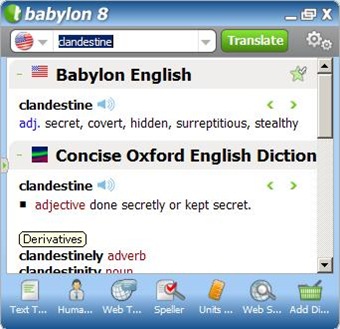
Babylon 8 is the solution for my need of having an excellent dictionary in my computer. I need dictionaries for finding the meaning of different words that I’m not familiar with. As I am surfing through the internet, I encounter a lot of words that I don’t know the meaning. This PC dictionary application helps a lot.
Babylon 8 doesn’t only includes a dictionary but also many different services such as thesaurus, speller, unit converter, translator to any language and more.
As for me, I will rate Babylon a perfect score. It all contains the things that I need. And it is really portable!
The thing I love the most on Babylon 8 is that I could just simply press Control + right click on the word to show the meaning and synonyms of the word. It will take less time than using a real dictionary. I would recommend this to all especially to writers and students.
Written by
JM
December 24, 2009

Whether you love note-taking or not, you’ll love Scribbly. It’s a note-taking application, therefore, you could write any notes. It uses small amount of memory and it is found in your system tray to quickly write notes, reminders, gossips , or anything. Then what? The best of this is that you can email them to you with a single click.
If you’re unto sending notes to a group, then you can since it’s enabled to send into multiply emails. You can also send it without the permission of the recipient. You could use it also as a prank. Remember that you could send those emails without permission and the name of the sender is “Scribbly”.
Once you've installed the application, you can simply click the system tray icon to bring up the single note-taking window. Then type in the note you'd like to send to yourself or to others, and then send it off with the click of a button.
Steps:

1. The upper gray box is the title of both the note and the email. While the bigger one is the message/note itself. Just place the title and message, then it’s already alright.
2. Configure the e-mail address through the settings part.
3. Remember that you could place more than 1 email address.
4. To send it as an e-mail , press the “Email your scribble” , that’s the icon with the envelope and an arrow.
5. Just use it all you want. It’s a great tool for note-taking.
- Download Scribbly (Adobe Air Application)
Written by
JM
December 21, 2009
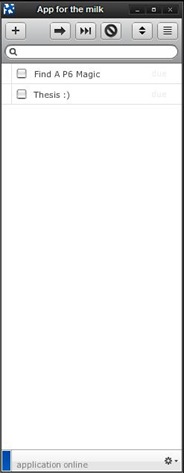
Remember the milk is so famous for it’s a tool that anybody can use to remind them of there duties works from your work to even personal stuffs. It’s an online to do list and task management.
I was wondering before if a desktop client exists. It is better if I can easily place tasks on it without having a hard time connecting to their website. And I am proud to present – application for the milk which brings your tasks to your desktop.
" The app allows you to manage your tasks in a stand-alone window, and works both online and offline (changes made when offline will be synchronized with RTM when you're back online). Thanks to
Adobe AIR, the app is cross-platform and supports Windows, Mac, and Linux. "
If you're looking for a way to quickly manage your tasks from your desktop, then this is the right tool for you. But you must first sign up in
Remember the Milk.
When you checked the finished task/s, then it will disappear in your list. You can also add tasks easily by just pressing the “+” sign and categorize it.
Note: You need Adobe AIR in order to install this useful software.
You can find the software here.


